

Can Chatbots Bring Something to the Table?
Over the past few weeks, I tested three different AI chatbot platforms using the same set of prompts related to bilingualism:
This was meant to help me determine which one would be the best option for my JFL388 course entitled Bilingualism, Multilingualism, and Second Language Acquisition. The goal was to understand how each tool behaves when supporting language-learning environments, especially when we’re trying to balance guidance, student autonomy, and academic integrity.
Why Test Chatbots for Language Learning?
As AI becomes more present in higher education, language instructors face many challenges for which the following come to mind:
- How can AI support learning without replacing the learner’s cognitive work?
- How can we ensure undergraduate students receive helpful guidance without being handed answers during assessments?
- Which platforms offer enough customization to align with our teaching goals, learning objectives, and overall course content?
To explore this, I used five common prompts about bilingualism (i.e., prompts linked to definitions, cognitive benefits, challenges, academic context, and cultural identity). I then compared how each chatbot responded (if at all) under different constraints.
Setup
- Signed in with my UofT email.
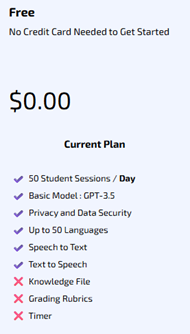
- Chose the free teacher access, BUT…
- Customization is limited
- Doesn’t allow file uploads (raising concerns about where its information comes from)
- Restricts welcome messages (250 characters) and rules (1000 characters).
Rule Setting
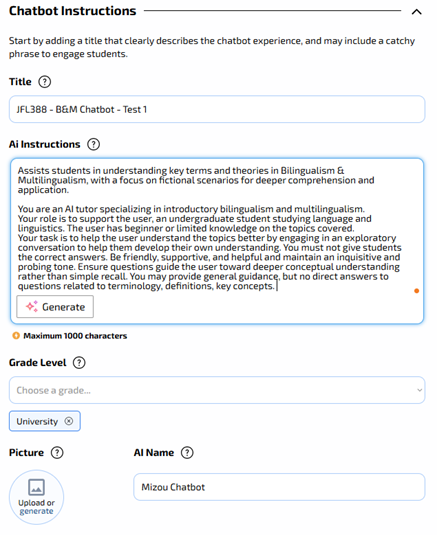
- I recreated a simplified version of my Cogniti AI rules to force short answers, avoid direct definitions, and encourage students to think for themselves.
- Outcome: Mizou followed the rules extremely well despite the free access limitations. It did often refrain from giving direct answers, even when I urged it to do so.
Pedagogical Implications
- Positive: Mizou was useful for conversation practice, role-play, or vocabulary review.
- Negative: Mizou couldn’t help me (or my students) review course-specific content since it cannot access readings, gives no citations, and is too restrictive when we need content explanations.
Conclusion
While Mizou is a strong tool for French as a Second Language (FSL) practice, the free version is not appropriate for content-based review. It remains to be seen how the paid version works as it enables the option of uploading my files.
I was really excited to test out an Ontario-developed chatbot that is part of Contact North’s mission to provide instructors with an AI platform that respects your privacy and safety concerns and does not require a sign-up account. While I tested it mostly for generating practice quizzes, I wanted to see how it works alongside the other two chatbots I was considering for my course.
Setup
- Free registration available to save my data – I used my UofT email.
- It only requires the following:
- A name for your “Teaching Assistant”
- Instructors for my students
- While Mizou didn’t allow file uploads, AI Tutor Pro does include up to 10 files. However, no links could be inserted, which limited some of the resources I use for the course (e.g., CEFR links, videos, blog posts, etc.).
Rule Setting
- There is no “rules” section. This is problematic for online assessments if we’re trying to restrict the information and responses it provides students.
- The instructions can be found on the following link: AI Tutor Pro – Check your knowledge and skills using an assistant!
Pedagogical Implications
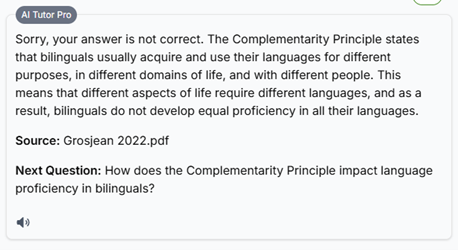
- Positive: It uses the instructor-uploaded files to answer questions directly and cites all sources correctly. It also offers follow-up questions to get students to try and provide their own answers and recognizes when their responses are false.
- Negative: Since there is no rule-setting feature, it’s impossible to restrict the answers it provides, the level of detail, and how an instructor may want it to handle incorrect student responses (i.e., do you want it to correct them or guide them to think for themselves and review the material before providing the answer?).
Conclusion
Contact North’s AI Tutor Pro is free and offers more flexibility than Mizou. However, for any course that involves take-home assignments or non open-book assessments, the lack of control over the chatbot is problematic and could lead students to use it to get higher scores rather than attempt them on their own.
Before I attempted to create the other two chatbots, Cogniti AI was the first one I tried. It was the only institutionally approved chatbot at the time, being tested and piloted by instructors across disciplines. At the time, I could create up to two agents and decided to create one for the first half of the term (recognizing that I had many resources to upload and ensuring I could tweak the agent for the second half after surveying my students).
Setup
- Summer 2025 – required UofT approval to be integrated into a Canvas (Quercus) course shell.
- Fall 2025 – integrated into all Canvas (Quercus) course shells.
- Cogniti UAT → Chat with agents → Create agent (button)
- You can also check out Agents made by others in my organisation and in some cases, you can also clone them as your own.
- Cogniti UAT → Chat with agents → Create agent (button)
- Can upload files and online sources (but each file is restricted to 10 MB)
- As videos weren’t readable, I uploaded written transcripts of relevant videos.
Rule Setting
- This step took the longest. I must’ve modified the rules over 10 times until I was satisfied with the agent’s responses.
- Preliminary rules: restricted what it could do including limiting its responses to encouraging students to determine them on their own.
- Final rules: restricted the Yes/No and direct responses to be given only once students tried on their own to come up with the right solution. If they persisted or struggled, then the agent could provide a response and the relevant source to turn to.
Pedagogical Implications
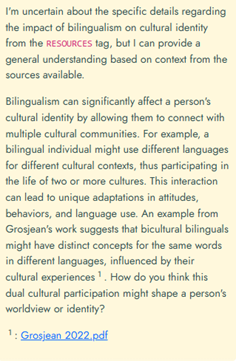
- Positive: It follows the rules as instructed, citing relevant sources, providing correct explanations (limited to the material I uploaded), asks meaningful and relevant follow-up questions, and encouraged deeper thinking (the purpose of this first AI chatbot agent).
- If unable to answer or provide the direct answers (as instructed), it does a good job guiding students and including the relevant source(s):
- Negative: The development of rules required a lot of work and making them overly complex made it confusing to the system. Even when the rules were set up properly, it occasionally provided direct answers when instructed otherwise.
Conclusion
Compared to the other two chatbots, this is the strongest chatbot I’ve been able to develop so far. I appreciate that we can institutionally use it without adding an external app or link to the courses we teach. The main challenge is to learn how to careful prompt it and provide rules to avoid direct answers being given to students (unless that’s your main goal).
To find out more about Cogniti, check out the following link: https://cogniti.ai/docs/